The Spreadsheet
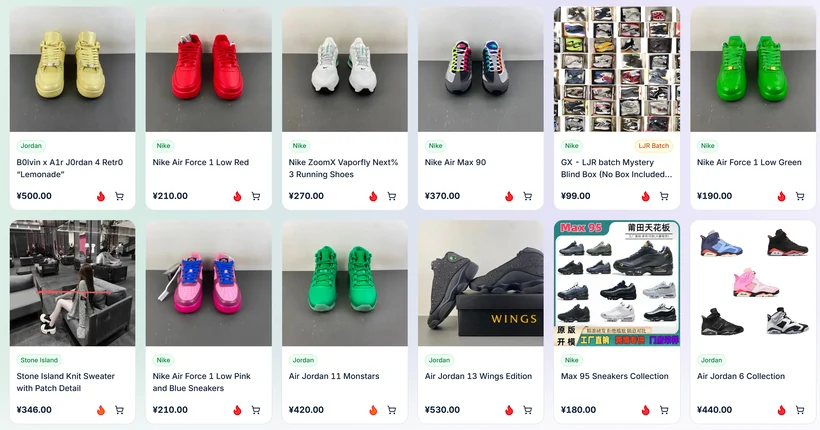
A wall of product cards that somebody else has already found
The word is a leftover. Years ago people really did swap shared documents of links, so the name stuck to the thing that replaced them. What a PonyBuy Spreadsheet means today is a listing site: product cards arranged by category, each carrying a picture, a name and the marketplace the item came from.
There is nothing to download and no file to open. You browse it the way you browse any shop, except that clicking through takes you to a Chinese marketplace item rather than to a checkout.
The catalogue behind the category cards on this site carries more than 20,000 items across 65 categories (our count, August 2026).
Why a Spreadsheet listing is worth using at all
It solves exactly one problem, and it happens to be the expensive one.
The wording problem is already solved
Somebody found the item, so you never have to guess what a seller called it in Chinese. This is the whole value.
You can see a category at once
Browsing shows you what actually exists in a category and roughly what it costs, which no amount of searching will.
The link works today
Cards get maintained. A link from a two year old forum post usually does not.
It is honest about what it is
A listing site holds no stock, takes no payment and makes no promise about quality. It is a directory, and directories age.
What it does for you, and what it still leaves you to do
The second column is the part people are surprised by, and it is the reason the rest of this guide exists.
The listing site handles
- Finding items that exist and are being bought
- Grouping them into categories you can browse
- Keeping a working link to each one
- Showing which marketplace each item sits on
You still handle
- Choosing the colour, size and version on the listing page
- Judging whether the seller photographs mean anything
- Writing down anything the options cannot express
- Deciding whether the total landed cost is worth it
How it fits together
From a card on the wall to a box at your door
Three sites, each doing one thing. It looks like more steps than it is.
Browse the listing site and open an item
Categories, pictures, prices. Click the item you want and the card sends you to the marketplace listing it describes.
Copy that link into PonyBuy
Paste it into the search box. The official guide calls this method one, and it is the route with the fewest ways to go wrong.

Coming from a listing card, this is the only box you touch. Choose the options on the listing page
Colour, size, quantity, plus a message if the options cannot say what you mean.
Let it run through the nine official steps
Purchase, inspection, storage, then a parcel when you decide to ship. Storage is free for 90 days.

What a listing site is not
It is not a stock system. A card can be live while the item behind it has sold out, because the card describes an item, not an inventory.
It is not a review site. Nobody at a listing site has handled the goods. The only photographs that mean anything are the ones taken at the warehouse after you buy.
It is not a price guarantee either. Prices move on the marketplace, and the number you finally pay includes domestic delivery, international freight and any customs charge in your own country.
And it is not a spreadsheet file. If a site asks you to download a document to see the products, that is a different thing wearing the same word.
Questions about the Spreadsheet itself
Do I have to use a listing site at all?
No. If you have links already, paste them straight into PonyBuy. The listing site exists for the case where you do not.
Is the PonyBuy Spreadsheet an official PonyBuy product?
No. Listing sites and agents are separate operations, and the one the category cards on this site lead to is no exception. This guide is written by a PonyBuy partner, which we say plainly on the about page.
Why do people still call it a spreadsheet?
History. The habit of sharing a document of links came first and the name outlived the format. Nobody has managed to replace the word.
How current is the catalogue?
Cards are added and pruned continuously, and the count moves. We give a number with the month attached rather than a fixed figure, because a fixed figure would be wrong within weeks.
How to choose a spreadsheet site, by the agent's own admission
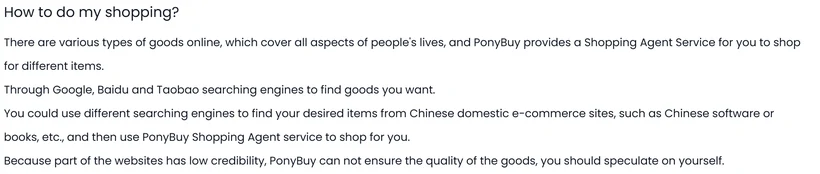
PonyBuy's help centre answers the question "How to do my shopping?" by telling you to find goods through search engines and Chinese shopping sites, and then adds a warning most agents leave out of their own guidance. The article tells you plainly that you should speculate on yourself
, because it will not vouch for where you found the thing. Read that as a division of labour: the agent buys whatever you point at, and everything about the quality of the list you pointed from stays on your side of the line.
That turns the choice of listing site into something you can test rather than something you take on trust. Four checks, in the order they pay off:
- Click five links and count the dead ones. Listings on Chinese marketplaces disappear constantly. A list nobody prunes is a list nobody reads, and the dead-link rate tells you that in under two minutes.
- Look for a date, anywhere. Not a "last updated" badge that a script writes on every page load, but dated entries: added on, checked on, removed because the seller closed.
- See whether it tells you anything after the link. A card with a picture and a price is a shortcut. A card that also tells you the item ships from a seller who charges domestic delivery separately has done work you would otherwise repeat.
- Check whether it says who runs it and how it is paid. Every list of this kind earns on referrals. The useful ones say so.
Apply the same four to this site. The disclosure is in the footer of every page, the change log is at updates, and the category cards near the top of the home page are where the dead-link test starts.