Finding an item
Four routes in, and only one of them is reliable
The official beginner guide gives two ways to start an order: paste a product link, or type a product name. Look at the search box itself and there are two more. An image icon sits inside it, and every listing page carries a Find Similar button. Neither appears in the written guide.
They are not equal. A link is exact. A name is a guess. A picture is a guess made by a machine. Find Similar is a guess made by the marketplace. Knowing which kind of guess you are making tells you how hard to check the result.
What the box says it takes
The home page box reads "Enter product name / link" and carries four small platform marks, with an image icon at the right hand end. The search box at the top of a product page words it the other way round: "Product link or name". Both accept the same two things.
The written guide names Taobao, Tmall and 1688. The marks inside the box include two more, one of them JD. The guide has not been updated to match. Our advice is to plan around the three that are written down, and to test the others by pasting a link, which costs nothing.

Route by route
How to use each door, and what breaks it
Work down this list. Every step down it, the guessing gets worse.
Paste the product link
Copy the address of the item page on Taobao, Tmall or 1688 and paste it into the search box. A link shared by a friend works the same way, and so does a link from a listing site.
What breaks it: a link that is not a product link. Share cards, shop fronts and search result pages all look like links and none of them is one item. If what you pasted opens a page with many products on it, that is the problem.
Type a product name
Short and generic. Two or three words describing the category, not a sentence describing the item. You are matching against titles a seller wrote in Chinese and a machine translated afterwards.
What breaks it: English adjectives. Nobody wrote "vintage washed oversized" in the original title, so nothing matches it.
Search by image
Use the image icon inside the search box and give it the clearest photograph you have. Plain background, whole item, no watermark.
What breaks it: a photo of the item on a person, at an angle, in bad light. Image matching is looking at shape and pattern, so give it shape and pattern.
The image icon sits at the other end of this same field. Use Find Similar on a listing you already have
Open any listing that is close to what you want and use the Find Similar button near the photo strip. It is the fastest way to move between sellers of the same item.
What breaks it: nothing much, but it inherits whatever was wrong with the listing you started from. Similar to a bad match is still a bad match.
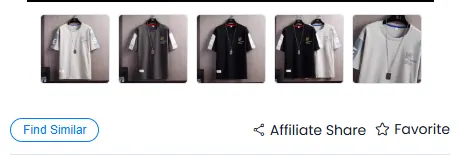
Find Similar sits under the photo strip, next to Favorite.
Why a perfectly good English phrase returns nothing
Look at a real order line. The product title reads "xi Dress Summer Beach Hot Party Floral Printed Sundress 2019". No English speaker would write that. It is a Chinese title translated word by word, keeping the original word order, with the first fragment mangled.
That is what your typed English is being matched against. The fix is not a cleverer phrase. The fix is to stop typing: arrive by link, by picture, or from a listing site where the wording problem was already solved by whoever added the card.
If you must type, type the plainest category word you can think of and then filter by looking, not by wording.
When it fails
A link that will not open is three separate problems
They look identical from your side and only one of them is yours to fix.
The listing has been taken down
The seller pulled it, or the marketplace did. No agent can restore a listing that no longer exists, and neither can a different agent site. Go back to the picture and search again from that.
The listing is fine, your option is not
It opens, but the colour or size you wanted has gone. The buttons often stay visible after the stock is at zero. Say in the message box what should happen if your first choice is unavailable, before you pay.
It was never a product link
A share card, a shop front or a page of search results. If the page you copied from showed more than one product, you copied the wrong thing. Open the single item first, then copy.
The item exists, at a different seller
Common for anything popular. Find Similar and image search both help here, and the second seller is often cheaper without being worse.
Browsing a listing site instead of searching
Neither approach chooses the variant for you. That still happens on the listing page.
Browsing suits you when
- You know the category but not the item
- You want to see what people actually buy in that category
- You have had three searches return nothing useful
- You would rather start from a picture than from words
Searching suits you when
- Someone handed you a link
- You want one specific thing and nothing else will do
- You are checking whether a second seller has it cheaper
- You already know the plain category word in Chinese
Once you have the listing open
The finding half is over. The choosing half is where the money goes.
Read the page block by block
Who wrote each part of a listing, which parts are promises and which are claims. Inside a listing
Learn the words on your own order
The option you clicked is stored in the seller Chinese. About twenty five words cover it. The reading list
Know the seven ways this goes wrong
Most of them happen between finding and paying. When the search goes wrong
See what happens after you pay
Nine steps, two payments, one deadline. After you order
How to pick the item, not just the listing it lives in
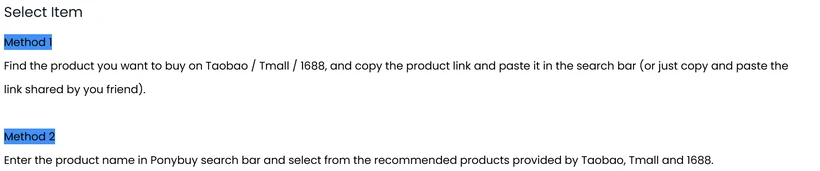
Two starting points are documented, labelled Method 1 and Method 2. One begins with an address you already hold, pasted in. The other begins with words, and hands you a shortlist drawn from the marketplaces. Different beginnings, identical ending: a product page. Everything that counts as choosing happens after you land on it.
Treat the arrival as the beginning rather than the end. Three things decide whether you get the thing you pictured:
- Open every candidate swatch at full size. Colour names on these listings are written for the domestic market and translate badly. The thumbnail strip is small enough that two shades of off-white look identical until you enlarge them. Shade sits on the excluded list, so a wrong swatch travels all the way to your door unremarked.
- Read the size band rather than the size letter. Several of these listings give sizes as weight ranges. A band that reads 130 to 145 kg is not a chest measurement and cannot be compared with one.
- Decide what the options cannot express, before you order. Anything that is not a swatch or a button has to be written down as a remark, and the official inspection scope says inspectors check apparel against your product remarks. A remark is the only part of your order an inspector is asked to verify against.
The listing walkthrough goes through a real product page block by block, and the request builder on that page turns the third point into a sentence you can paste.
If you have a word but not a link
Search our own catalogue instead of the marketplace. It is a much smaller pile, everything in it has a working link, and the wording problem was solved by whoever added the card.
Try a plain category word rather than a description. hoodie and sneakers both work; "oversized vintage washed hoodie" will not, in any search box anywhere.
How to choose a seller when you cannot read the shop page
You will usually meet a seller as a name in Chinese attached to a listing somebody else found. There is a trick for turning that into a decision without reading a word of the shop page, and it comes out of PonyBuy's own fee rules rather than out of seller ratings.
Put four items through one shop in a single checkout and the inland leg is billed once. Spread the same four across four shops and four vans drive to the warehouse, each with an invoice. The official wording for the first case is that the fee is charged once
when the purchasing order goes through together. So the question is rarely "is this seller good". It is usually "does this seller also carry the other three things", and answering that settles three of the charges while everything is still in China.
There is a ceiling on it, and the same article states where. Pile enough onto one order and the parcel tips over a weight threshold, at which point a purchaser contacts you to settle a delivery balance. The saving therefore runs only as far as the scales allow, and stops the moment the box gets heavy.
Beyond the fee arithmetic, two signals are readable without Chinese. A listing with seventeen colour thumbnails and four weight-based size bands is a seller operating at volume, which usually means the stock exists and the photographs are their own. A listing with three empty fields in the purchase record block is a seller who did not fill them, and that is a choice they made rather than information the platform lost.
